Zid → Google Sheets
Zid orders in Google Sheets
Every new order becomes a row in your Google Sheet: time, order number, status, total, customer and email.
Start free trial7-day free trial · no credit card
What you get · Sample data
| Received at (UTC) | Event | RawNak ID | ID | Status | Total | Customer | |
|---|---|---|---|---|---|---|---|
| 2026-10-20 18:41 | order.create | 8492 | 8492 | جديد | 215.5 SAR | خالد الشمري | [email protected] |
| 2026-10-20 18:55 | order.create | 8494 | 8494 | جديد | 89 SAR | ريم الدوسري | [email protected] |
Sheet: RawNak
Set it up in three parts
- 1
Create your RawNak workspace
- Sign up, then copy your endpoint URL and signing secret from the dashboard.
- 2
Connect Zid
- In your Zid partner app, create a webhook with the Create Webhook API and set target_url to your RawNak endpoint.
- Pick the event you need, for example order.create.
- Set username to any name and password to your RawNak signing secret, so RawNak can verify each request.
- 3
Add Google Sheets as a destination
- In RawNak, open Destinations → Add destination → Google Sheets and copy the ready-made script.
- In your sheet, open Extensions → Apps Script, paste the script and deploy it as a Web app (Execute as: Me, Who has access: Anyone).
- Paste the Web app URL back in RawNak, save and press “Test connection”.
Zid does not sign webhooks, so RawNak checks the username and password on every request and rejects anything else.
Full step-by-step guide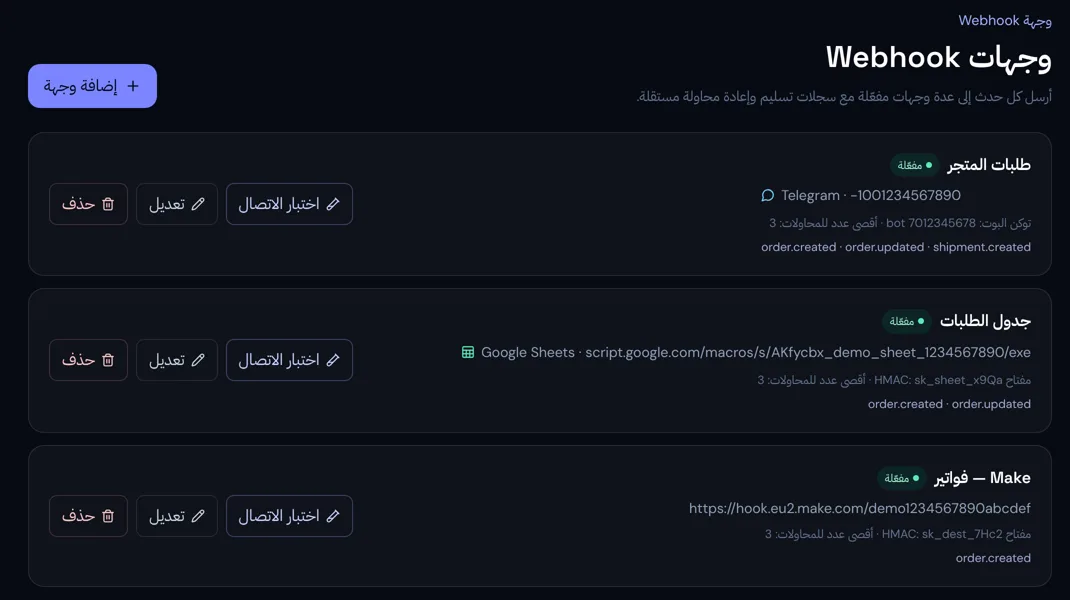
Why route it through RawNak
A live order log you can filter, share with your accountant or chart, with no Google password stored on our side.
- Every order is stored the moment it arrives, even if the destination is down.
- Failed deliveries are retried automatically, and any order can be resent from the delivery log.
- Choose which events go to each destination, so you only see what matters.